-
[HTML/CSS] 가계부 만들기개발 여정/FrontEnd 2021. 9. 9. 18:44
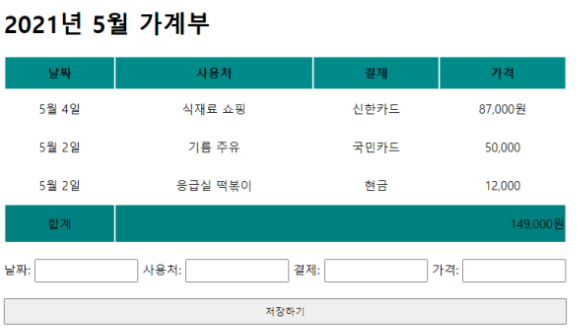
문제 :
테이블 태그를 사용하세요.
테이블 위에 마우스를 올리면 해당하는 행에 색이 변하도록 꾸며보세요.
HTML
<!DOCTYPE html>

<html>

    <head><title>가계부</title></head>

    <link rel="stylesheet" href="style.css" type="text/css">

    <table>

        <span class="text">2021년 가계부</span>

    <thead>

        <tr>

            <th>날짜</th>

            <th>사용처</th>

            <th>결제</th>

            <th>가격</th>

        </tr>

    </thead>

    <tbody>

        <tr>

            <td>5월 4일</td>

            <td>식재료 쇼핑</td>

            <td>신한카드</td>

            <td>87,000원</td>

        </tr>

        <tr>

            <td>5월 2일</td>

            <td>기름주유</td>

            <td>국민카드</td>

            <td>50,000원</td>

        </tr>

        <tr>

            <td>5월 2일</td>

            <td>응급실 떡볶이</td>

            <td>현금</td>

            <td>12,000원</td>

        </tr>

        <tr id="last">

            <td>합계</td>

            <td colspan="3" id="total">149,000원</td>

        </tr>

    </tbody>

</table><br>

날짜:<input type="text" class="input"> 사용처:<input type="text" class="input" width: 30px> 결제:<input type="text" class="input" width: 30px class="input"> 가격:<input type="text" class="input"width: 30px><br>

<br>

<button type="text" class="saveBtn">저장하기</button>

</html>
CSS
.text{font-size: 40px; font-weight: bolder;} th{background-color: teal; width: 200px; height: 40px} td{text-align: center; height: 50px} tbody tr:hover {background-color:cadetblue;} #last{background-color: teal;} #total{text-align: right; padding-right: 10px;} .input{width: 150px} .saveBtn{width: 820px}'개발 여정 > FrontEnd' 카테고리의 다른 글
[BootStrap] 의류 쇼핑몰 메인 페이지 만들기 (0) 2021.09.09 [BootStrap] 택배회사 메인 페이지 만들기 (0) 2021.09.09 [BootStrap] 레이아웃 구조 (2) :: d-flex 이용해서 header, section, footer 나누기 (0) 2021.09.09 [BooStrap] 레이아웃 구조 (1) :: d-flex 이용해서 header, footer 나누기 (0) 2021.09.09 [HTML/CSS] 달력 만들기 (0) 2021.09.09